The routes that look shorter
Deploying to a staging environment
Forwarding a port on your router
A hosted request bin
One command
Run the command
$ zgrok http 3000Register the URL
The banner prints a public URL. Register it with the provider, path included, in whatever field their dashboard calls the endpoint. Which address you are handed is worth reading before you paste it, and the section on deciding the address covers it:texthttps://a7f9x2--acme-shop.zgrok.io/api/webhooks/stripeTrigger the event
Trigger the event, and the request arrives at127.0.0.1:3000with the path you registered. The CLI dials127.0.0.1first and then::1, so an app listening on either address is reached.
What the tunnel does to the request
Nothing is removed or rewritten.
On an HTTP tunnel the request head and body are relayed as they arrive. Every header the provider sent arrives spelled the way they sent it, in the order they sent it, with the body byte for byte behind it. Stripe-Signature and X-Hub-Signature-256 are not special cases here: there is no rewriting step on this path for them to survive. Our edge adds the usual X-Forwarded-For, X-Forwarded-Proto and X-Forwarded-Host on the way in, the way any reverse proxy does, and touches nothing the provider sent.
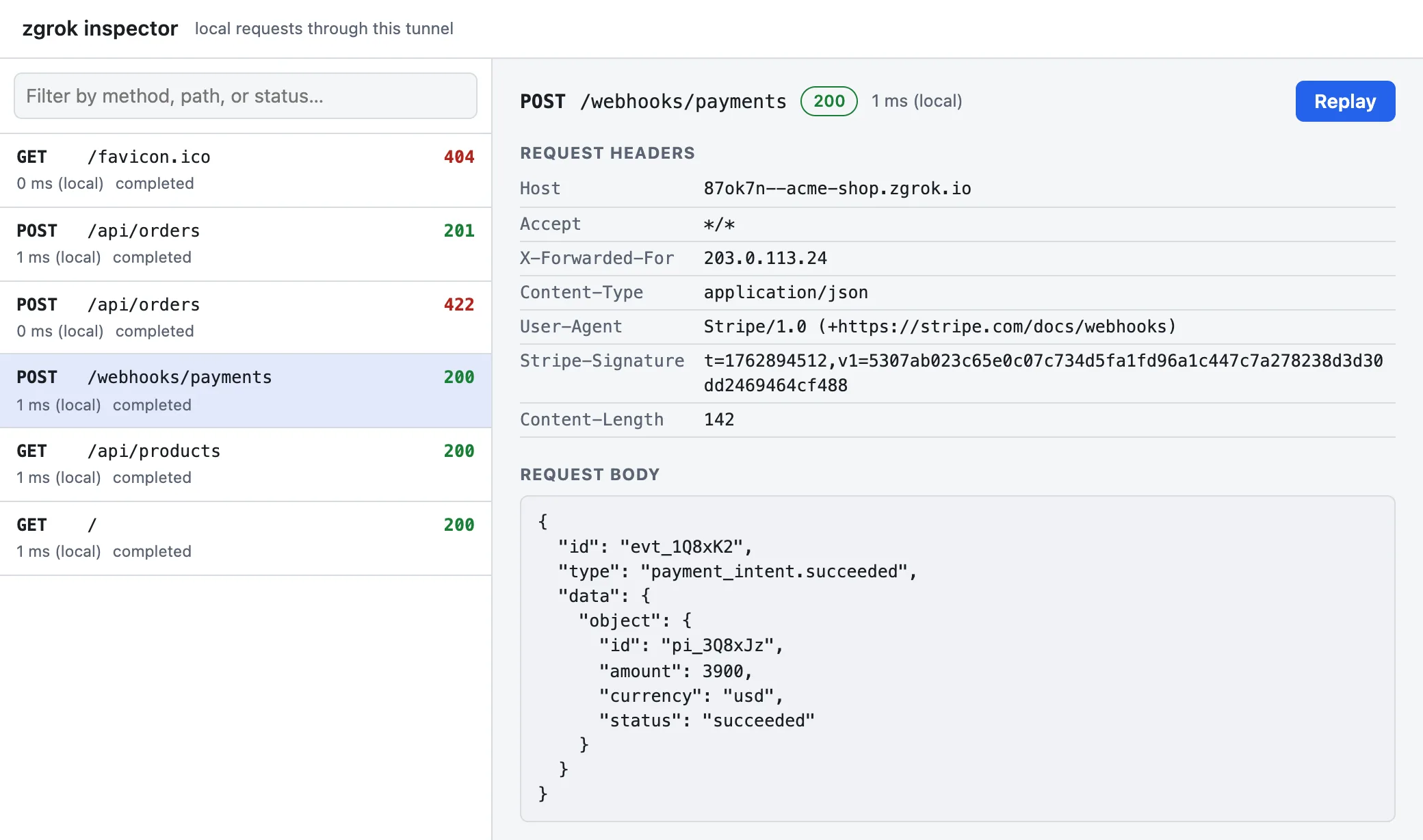
Two consequences are worth knowing in advance rather than at three in the morning.
The tunnel hostname
Host your app sees is the tunnel hostname, not localhost: a framework that validates the request host against an allowlist will reject the delivery until you add that hostname.The hop to your app
X-Forwarded-Proto.The response side is not quite as untouched, and none of it affects a webhook. zgrok stamps X-Robots-Tag: noindex, nofollow on responses it proxies, unless your backend already stated a robots policy, so a tunnel address asks search engines not to index it as a page on our domain. It also replaces whatever your backend said about connection reuse with Connection: close, because zgrok serves one request per TCP connection.
Decide the address before you paste it
A webhook endpoint is a URL you type into someone else's dashboard, which makes it the one place a changing address genuinely hurts. So it is worth knowing which one you are getting.
An assigned address
zgrok http 3000, which hands you a different name, and the endpoint you registered stops resolving to you. That is workable while you are still wiring things up, at the cost of re-registering, and it is the reason the section below exists.A tunnel name you choose
$ zgrok http 3000 --subdomain myapp
In a project called acme-shop, the endpoint stays https://myapp--acme-shop.zgrok.io/api/webhooks/stripe across restarts, so you register it once. A reconnect after a dropped connection keeps the address either way: the CLI pins the name it was given for the life of the process, so a network blip does not move your endpoint mid-session. It says so in the terminal on the one occasion it cannot, which is a tunnel deleted from the dashboard while the CLI was still holding its name.
Trigger once, then stop asking
Getting the delivery to arrive is the fast part. The loop after it is what takes the afternoon: fix a line, and now you need that same event again, so you go back to the provider and click resend, and again, and again.
Unless you turn it off, every tunnel runs a request inspector on your own machine and prints its address in the same banner:
Inspect: http://127.0.0.1:4040
Open a delivery, read its headers and body, and press Replay. zgrok sends the captured bytes straight to your local port rather than back out through the tunnel, so the provider never learns you re-ran anything and nothing fires again on their side. Your own handler runs again in full, side effects included, which is the point and worth remembering before you replay a payment event forty times.
The signature headers are the ones the provider computed, so verification is exercised for real rather than against a signature you made up in a saved curl command. The inspector holds the last 50 requests in memory for the life of the tunnel, and captures bodies up to 128 KB in each direction. A delivery whose body ran past that limit is captured but refused for replay, and says so, rather than being replayed as a body that contradicts its own Content-Length. It binds to loopback only, which matters here: those captured bodies hold whatever the provider sent you. Loopback does not keep web pages out by itself, so the inspector checks who is asking too.
You only need one delivery is the longer argument, including what replay will not do.
Who else can reach the URL
An assigned address is six random characters, which keeps the URL out of the way without protecting it. zgrok does not publish it, and because tunnel hostnames are served under a wildcard certificate, yours does not show up in a certificate transparency log the way a per-host certificate would. That is obscurity, not a control: a six-character name is small enough to enumerate, and anyone holding the URL reaches your handler for as long as the tunnel is up. For most webhook work that is fine, because the tunnel is up while you are sitting in front of it. When it is not fine, Pro tunnels can restrict which addresses are allowed through:
$ zgrok http 3000 --allow-ip 203.0.113.50,198.51.100.0/24
Whether that helps depends on something we cannot tell you: whether your provider publishes the addresses it delivers from and commits to them. That is a question for their documentation, and the answer differs by provider. The simpler control is the one you already have, which is that the tunnel exists only while the command is running.